Tor Browser Overview
Tor Browser for Mac is a free, privacy-focused browser built by The Tor Project, a nonprofit organization, that routes your traffic through three layers of relays to protect against tracking and surveillance. Version 15.0.19, the current release, updates the browser's Firefox base to 140.13.0esr and backports security fixes from Firefox 153. Originally developed as an onion-routing project for the U.S. Naval Research Laboratory, it's now used daily by journalists, activists, researchers, and everyday users who want stronger privacy online. It requires macOS 10.15 or later and runs natively on both Intel and Apple Silicon Macs. It's completely free, with no subscription or account required.
Why Choose Tor Browser for Mac
Standard browsers, even in private mode, still let websites track you through your IP address and browser fingerprint. Tor Browser routes your traffic through multiple volunteer-run relays before it reaches its destination, making it significantly harder for any single point in that chain to link your browsing back to you.
It also comes with privacy protections built in rather than added on. NoScript and HTTPS-Only mode are enabled by default, and the browser actively blocks plugins like Flash and QuickTime, since those can be manipulated to reveal your real IP address. The Tor Project specifically recommends against installing additional add-ons, since third-party extensions can undermine the same protections the browser is built around. If Tor won't connect, the most common cause isn't censorship, it's an incorrectly set system clock.
Key Features
- Traffic routed through three layers of relays for anonymity
- New Identity button for restarting your session with a fresh IP route in one click
- NoScript and HTTPS-Only mode enabled by default
- Automatic blocking of browser plugins like Flash and QuickTime
- Session-only cookies and no stored browsing history by default
- Bridge support for connecting from countries where Tor is blocked
- Digital signature verification for confirming download authenticity
- Firefox ESR foundation, regularly updated with backported security fixes
- Built-in resistance to browser fingerprinting techniques
- Portable design that runs without a traditional installer, even from a USB drive
What's New in 5.0.19 Version
Tor Browser 15.0.19, officially released July 21, 2026, focuses on security and stability updates. Recent changes include:
- Updated NoScript to version 13.6.31.1984
- Rebased Tor Browser stable onto Firefox 140.13.0esr
- Backported security fixes from Firefox 153
- General bug fixes and stability improvements
- An alpha channel release, version 16.0a9, is also available separately for users who want to try upcoming features early, though the stable 15.0.19 release is recommended for most people. Since Tor Browser tracks Firefox's security releases closely, updates like these are typically about staying current with the latest browser-level security patches.
Supported macOS Versions
Tor Browser requires macOS 10.15 or later and runs natively on both Intel and Apple Silicon Macs. The download is around 168.75MB. Since privacy tools like this benefit from staying current, checking for updates regularly is worth doing, especially since security patches are backported from Firefox on an ongoing basis.
How to Install Tor Browser on macOS?
Setting up Tor Browser on your Mac takes just a few steps.
- Download the latest version of Tor Browser for Mac.
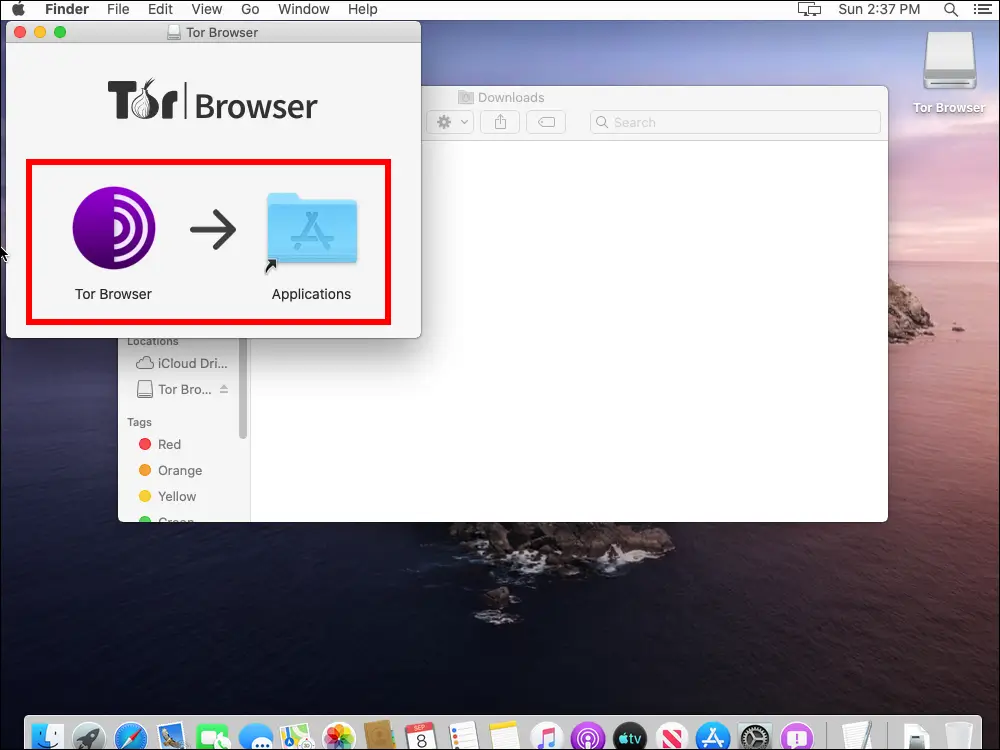
- Open the downloaded disk image (.dmg) file.
- Drag the Tor Browser icon into your Applications folder.
- Launch Tor Browser from your Applications folder.
- Wait for the browser to connect to the Tor network before browsing.
- Once connected, you can start browsing with Tor's privacy protections active right away.
How to Use Tor Browser mac?
- Open Tor Browser and wait for it to establish a connection to the Tor network.
- If Tor is blocked in your location, configure a bridge during setup.
- Browse normally, keeping in mind that some sites may load more slowly.
- Avoid installing additional add-ons, since they can weaken your privacy protections.
- Check the Tor Browser manual if you run into connection or configuration issues.
Final Verdict
Tor Browser remains one of the most established tools for browsing with real privacy protections, built on relay-based routing and defaults like NoScript and HTTPS-Only mode rather than optional extras. The trade-off is speed, since routing through multiple relays adds latency that a standard browser doesn't have. For journalists, researchers, privacy-conscious users, or anyone browsing from a censored network, Tor Browser remains a trusted, well-maintained option on Mac.
Download Tor Browser for Mac Latest Version
Ready to browse with stronger privacy protections built in?
Download Tor Browser for Mac to route your traffic through the Tor network, with NoScript, HTTPS-Only mode, and plugin blocking enabled by default. Whether you're a journalist protecting sources, a researcher studying censorship, or simply someone who wants more privacy online, Tor Browser gives you a free, well-established way to browse with reduced tracking.